
Connect Checkmark to Your Canvas
Done once per school or district by a Canvas admin. Teachers don't need to do this.
Dynamic Registration
Paste one URL into Canvas and it configures Checkmark for you. About 10 minutes, with a 45-second video.
Manual Setup
Create the LTI key by pasting the JSON configuration we send you. For Canvas instances that can't use Dynamic Registration.
Either Way, Contact Us to Turn It On
After registering in Canvas, email support@checkmarkplagiarism.com. We link Canvas to your school's Checkmark license and switch it on. Until then, teachers see a “setup pending” message.
Add Checkmark to an Assignment
Done in Canvas, once per assignment. Open the assignment, click Edit, and add Checkmark under Document Processing App(s).
Add Checkmark Under Document Processing App
On the assignment's Edit page in Canvas
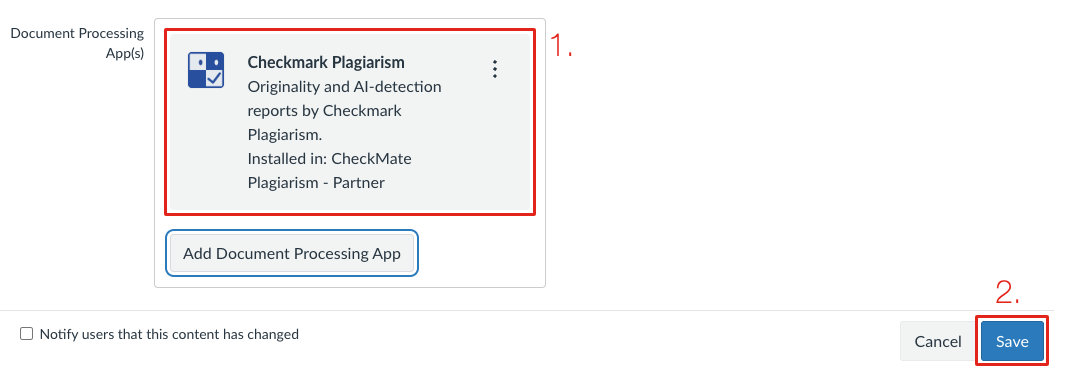
- • Edit the assignment, click Add Document Processing App, choose Checkmark Plagiarism, and Save.
- • Reports then appear in SpeedGrader, under Document processor reports.
- • Step by step, with a video: Document Processor guide.
Check Work Turned In Earlier
From the Checkmark panel on the assignment
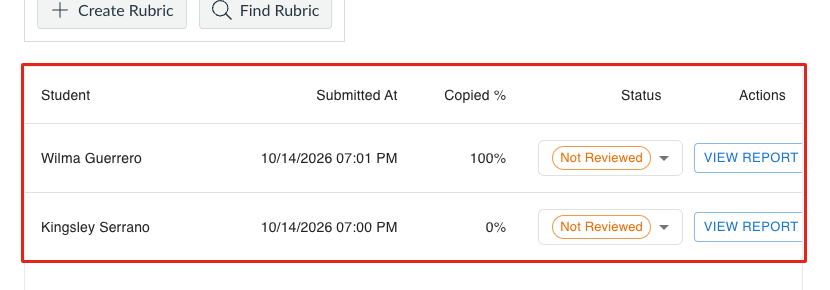
- • Checkmark checks work students submit after you add it. Work turned in before that isn't checked automatically.
- • To check it, connect Checkmark to Canvas when the panel asks, then choose Check earlier work.
- • Those reports appear in the Checkmark panel on the assignment, not in SpeedGrader.
Quizzes Work Differently
Canvas's Document Processing App doesn't run on quizzes of either kind. Classic Quizzes use Checkmark writing questions inside the quiz, which needs you to connect Checkmark to Canvas once. New Quizzes aren't supported. For a quiz-style essay, create a text-entry or file-upload assignment and add Checkmark under Document Processing App. See the Canvas Quizzes guide.
Students Submit Like Any Canvas Assignment
Nothing to install. They can also write and submit in Checkmark's own box on the assignment.
The Checkmark Box
Under the assignment description.
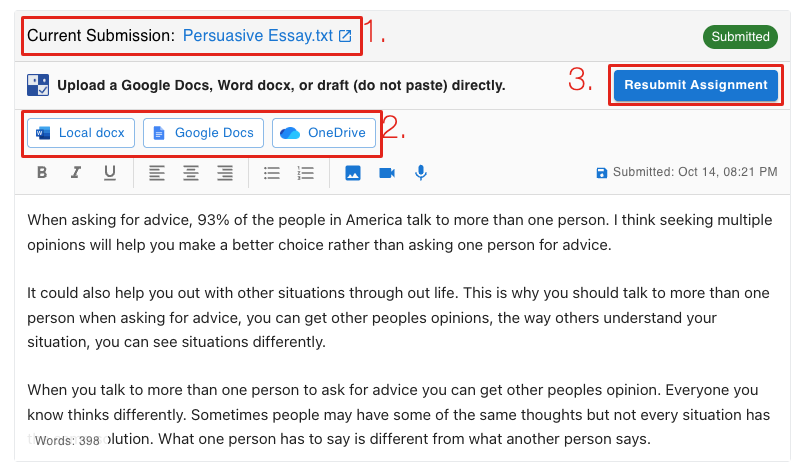
Students write here, or bring in a Google Doc, Word file or OneDrive file. Essays written here also record how they were written (pasted text and playback).
Or Canvas's Own Submit
File upload or text entry, the usual way.
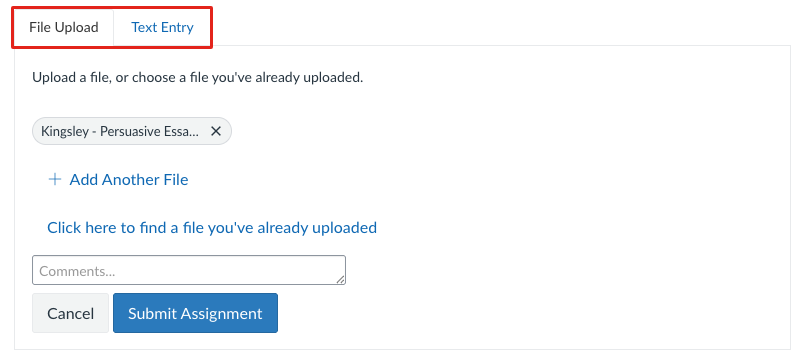
Checked automatically on Document Processor assignments. Share the Canvas student guide with your class.
Where to Find Reports
Usually ready a minute or two after a student submits.
In SpeedGrader™
The Checkmark card, next to the student's work
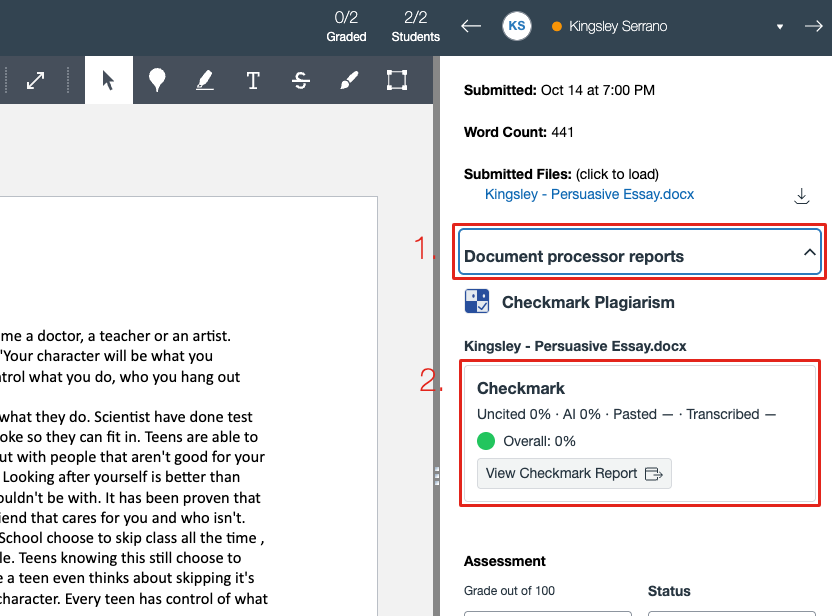
Uncited, AI, Pasted and Transcribed, with a colored dot for the overall score. Click View Checkmark Report for the full report.
On the Assignment Page
Every student, with a View Report button
Mark submissions Needs follow-up, No concerns or Resolved from the Review status menu. For the full report, see Reading the Report.
Document Processor
Add Checkmark to an assignment in four clicks and read reports in SpeedGrader. With a 1-minute video.
Canvas Quizzes
Add Checkmark writing questions to Classic Quizzes. New Quizzes aren't supported.
Autograder & Rubrics
Rubric scores drafted by Checkmark, published to Canvas.
Frequently Asked Questions
I don't see Checkmark anywhere in Canvas.
It says setup is pending.
Can I check work students already turned in?
Do I need to connect Checkmark to Canvas before I add it to an assignment?
Which file types are checked?
Do students see their report?
Need Help?
Our support team can walk you or your Canvas admin through setup.