
Integrity evidence inside the Buzz questions you already use
 Buzz
BuzzNo rebuilt courses, no separate assignment for students to find, and no change to how you grade.
We support LTI 1.3. On Buzz, we can do better than that.
Dynamic registration, single sign-on, deep linking, roster sync: all of it works. But an LTI assignment is still a separate activity a teacher builds and a student has to find. On Buzz, Checkmark attaches to the essay questions already sitting in your assessments.
Students write in Buzz
Same assessment, same essay question, Buzz's own editor. Nothing for a student to install or learn. A teacher connects a question by pasting one line into its feedback area.
Reports open in the gradebook
The report renders under the question, inside Buzz's grading view. Similarity matches show their sources, and AI likeness is marked passage by passage.
Grading included, or keep BusyBee
Autograding against the question's own rubric comes with Checkmark, switched on per course. Already running BusyBee and happy with it? Leave ours off. The two are fully compatible.
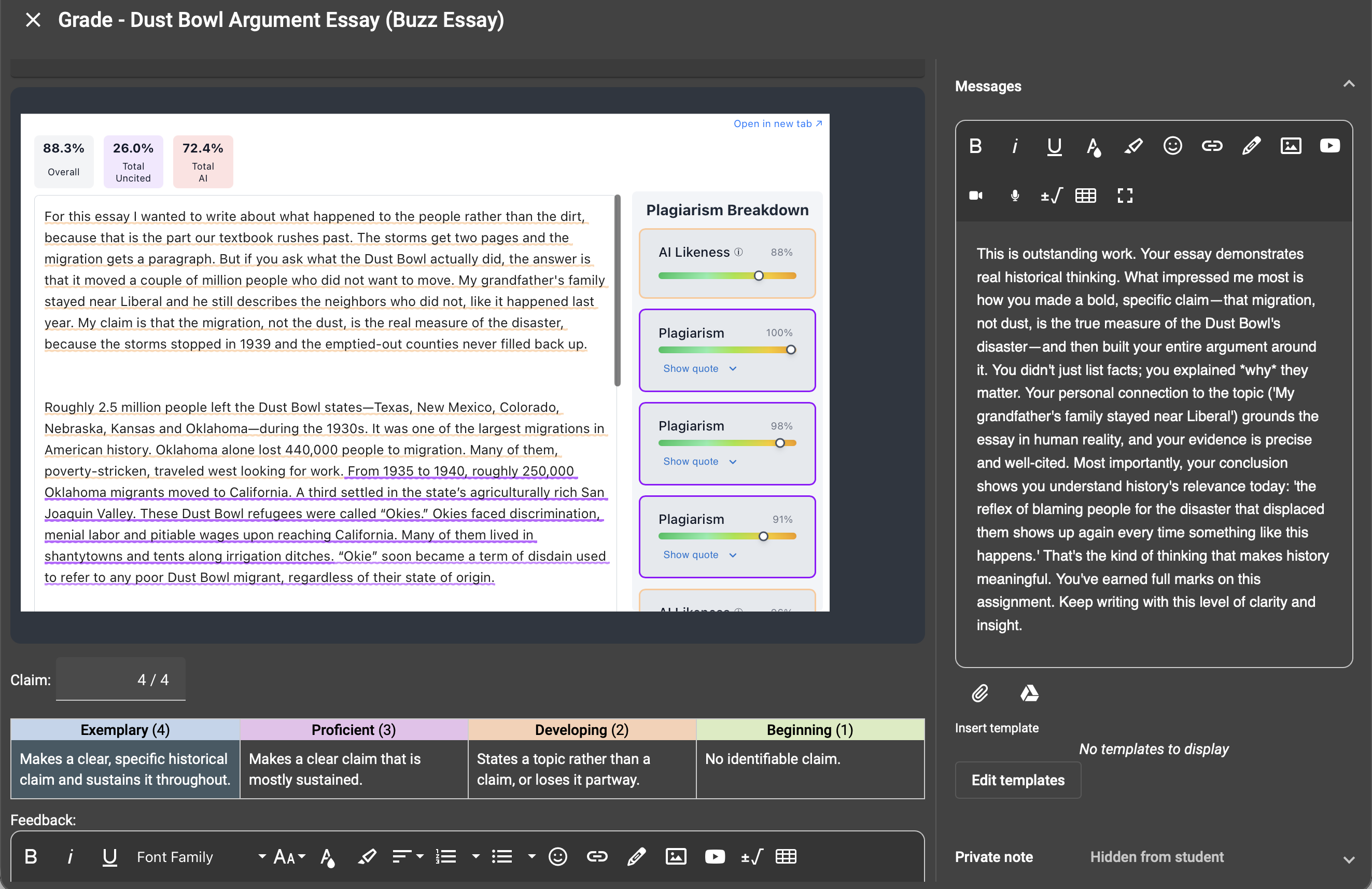
You choose who grades
Let Checkmark grade, or leave our grading off and let BusyBee do it. With ours off, Checkmark writes nothing into a grading field at all and you still get the integrity report under the question. Change your mind whenever you like.
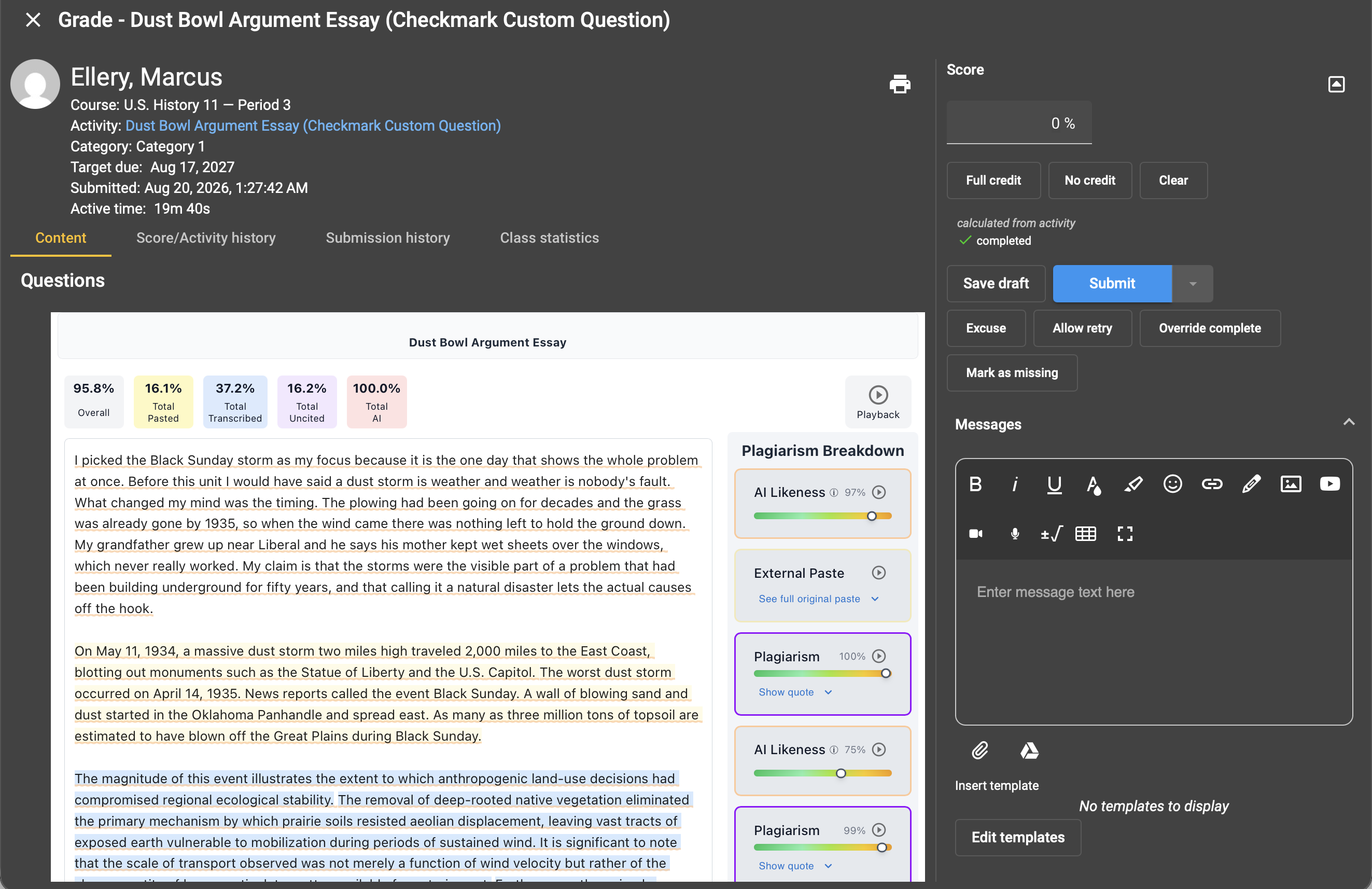
Go beyond the finished essay with Custom Question
Switch the same question to Custom and the student writes in Checkmark's editor instead. The report stops being a verdict on the text and becomes a record of how it came to exist.
Paste detection
Clipboard text is marked with the moment it landed. A paste is a fact about the session, not an inference from the finished text, so it holds up in a conversation with a student.
Transcription
Retyping defeats paste detection, so Checkmark reads timing as a separate signal. Composing and copying produce different rhythms, and the report names the patterns behind each flag rather than asking you to trust a score.
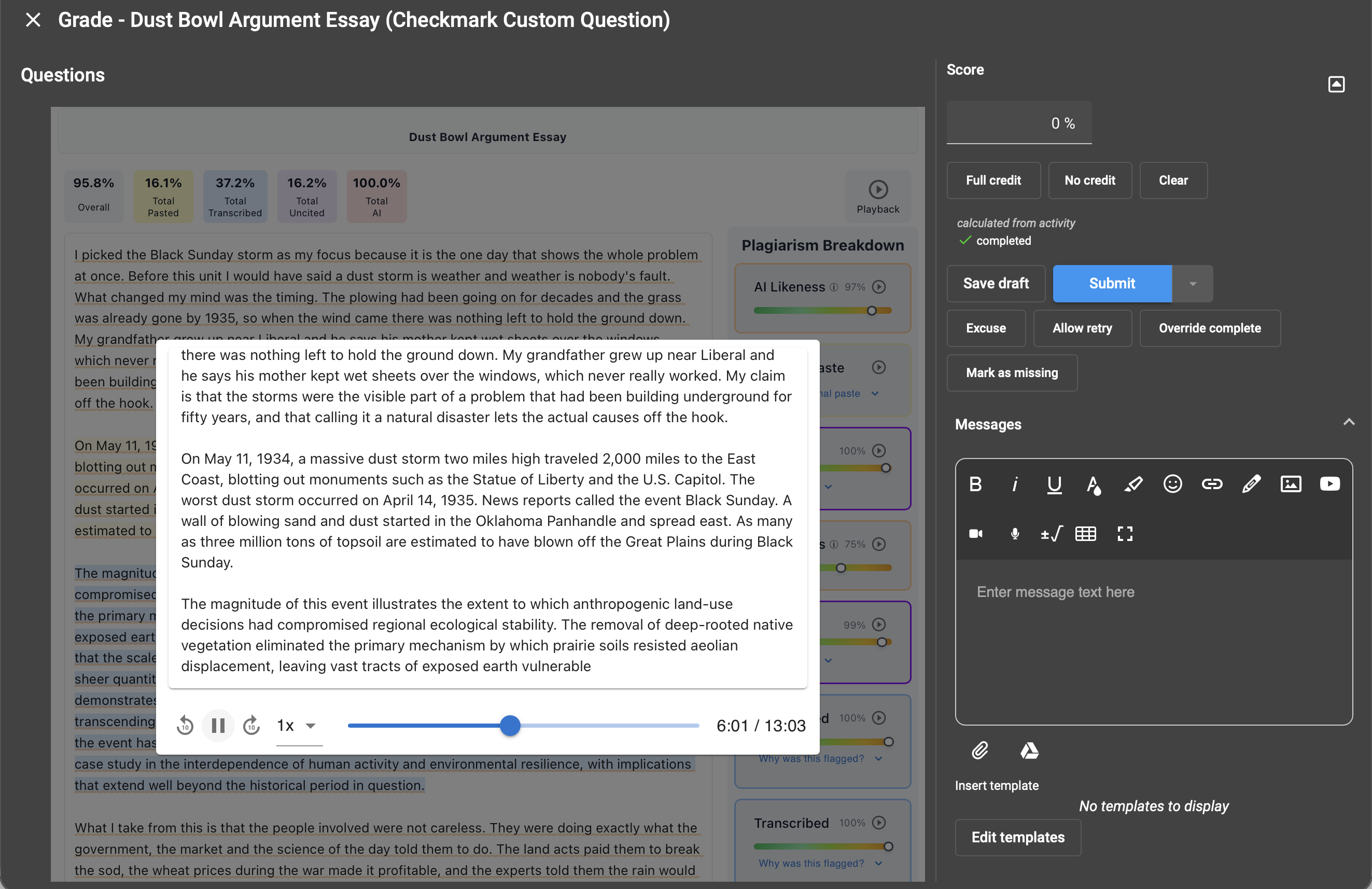
Playback
Replay the session from blank page to submission. It can support a student's account of how they wrote just as readily as it raises a question, and turns an accusation into something you can watch together.
Google Docs, brought over whole
Students who drafted in Google Docs import the document with one button. The text arrives instantly, and so does the document's edit history, so paste detection, transcription and Playback still work on writing that happened before the student ever opened Buzz.
Access built in
The question handles access, so the report is there when the teacher opens it. No link to find, nothing to redo on another device. Both paths confirm the reader can already grade the course. This one takes fewer steps.
AI likeness, not AI likelihood
Checkmark does not claim to know who wrote something. No tool can. What it measures is resemblance: AI writing carries interconnected signatures across word choice, phrasing, syntax, and rhythm, and Checkmark reports the share of an essay that resembles that pattern to a high degree.
So passages are underlined individually rather than reduced to one number, and short answers are reported as not applicable instead of guessed at. On Custom Question the same report also shows how the text was produced, so a signal can be corroborated, or cleared, by the writing process behind it.
What setup actually requires
One service account, two read permissions, entered once. A reseller can hold one credential at the parent domain and cover every school beneath it.
Service account
Created in the Buzz Admin App. Encrypted at rest in Checkmark.
Permissions
Domains: Read and Courses: Read full. Nothing else. Anything more widens the credential for no benefit.
Scope
School level, or once at a reseller's parent domain. No per-teacher step.
Privacy
FERPA compliant. Encrypted connections, and Buzz credentials stored encrypted. Under our privacy policy, student submissions are not used to train AI models.
Two things worth getting right up front
- Attach rubrics to the question. A rubric on the question can be scored row by row. One pasted into a question variable cannot support per-criterion write-back.
- Let the assessment show answers on review. If it hides answers after submission, there is nothing for a report to read. Connect a question by hand and this is the setting to check.
Frequently Asked Questions
Buzz LMS integration FAQ
Everything you need to know about Checkmark and Buzz LMS.
See it on one of your own Buzz assessments
We can connect a single question in a course you already run. Look at the report before deciding anything.