
The writing process is inherently iterative, but across secondary and postsecondary institutions, writing instructors are forced to abandon multi-draft revision cycles due to an overwhelming assessment burden: evaluating 150 students across multiple drafts consumes 40 to 60+ hours per assignment unit. Native Canvas SpeedGrader lacks built-in scaffolding for multi-draft versioning, automated criterion-level suggestions, and writing process verification. By integrating Checkmark Plagiarism via 1EdTech LTI 1.3 Advantage (AGS 2.0) and the Canvas rubric_assessments API, institutions can transform SpeedGrader into an automated, teacher-in-the-loop revision hub. Checkmark generates verbatim quote-anchored rubric justifications, provides differential revision analysis comparing Draft 1 to Draft 2, and captures patent-pending Essay Playback™ keystroke dynamics. This end-to-end technical guide details the LTI 1.3 configuration, API rubric binding, multi-draft assignment workflows, and educator calibration protocols that substantially reduce grading overhead while improving student revision efficacy.
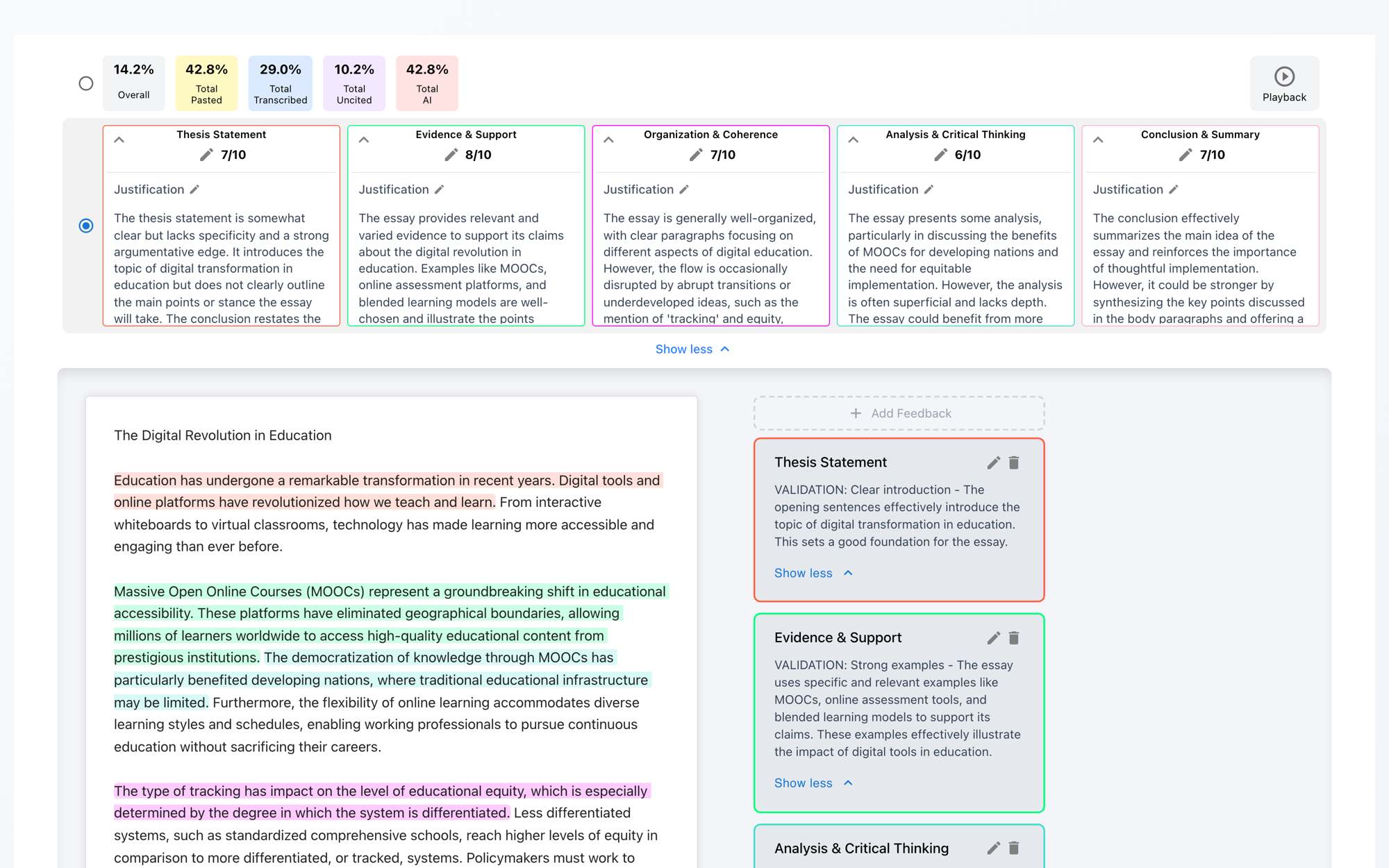
Checkmark Plagiarism bridges LMS evaluation workflows by combining AI autograding with writing process replay, AI detection, plagiarism detection, and deep integrations with Canvas LMS.
1. The Multi-Draft Grading Overhead in Canvas LMS
Composition theorists and educational researchers—from Nancy Sommers and Donald Murray to John Hattie—have long established that writing development occurs during revision, not initial drafting. When students receive actionable, formative feedback on early drafts and are given the opportunity to restructure arguments, refine evidence, and polish syntax, their cognitive writing gains increase significantly compared to single-submission summative grading.
However, in modern secondary schools, community colleges, and universities, assigning multi-draft writing cycles (e.g., Outline → Rough Draft → Formative Revision → Final Polish) creates an unsustainable evaluation crisis for educators.
The Multi-Draft Grading Arithmetic Crisis
• Standard Instructor Roster: 150 Students (5 sections × 30 students)
• Average Formative Draft Evaluation: 10 minutes per draft
• Average Summative Final Evaluation: 15 minutes per paper
The Three Structural Failure Modes of Native Canvas SpeedGrader
While Instructure Canvas is the dominant Learning Management System (LMS) across global education, its native SpeedGrader environment was architected primarily for single-submission, point-in-time grading. When instructors attempt multi-draft assignments, three critical friction points emerge:
Rubric Overwrite & State Clobbering
In standard Canvas assignments configured for multiple attempts, SpeedGrader displays submission attempts in a dropdown menu. However, updating rubric criterion scores on Attempt 2 often clobbers or complicates the visibility of Attempt 1 formative comments, making it tedious for instructors to compare what changed between drafts.
The Feedback Decay Curve
Spending 25+ hours reading Draft 1 creates feedback latency of 10 to 18 calendar days. By the time students receive formative marginalia, the classroom has moved to the next thematic module, rendering the formative feedback pedagogically inert.
Integrity Telemetry Disconnection
Canvas SpeedGrader has no native visibility into how the text was produced. If a student turns in a flawless Draft 2 after a mediocre Draft 1, the teacher cannot tell whether the student undertook rigorous substantive revisions, retyped an AI-generated draft, or pasted an entire essay from an unauthorized external LLM.
| Traditional Canvas SpeedGrader Workflow | Checkmark LTI 1.3 + SpeedGrader Workflow |
|---|---|
| • 10–15 min manual reading per draft | • 60–90 sec teacher review & calibration |
| • Generic, manual rubric comment typing | • AST-grounded quote-anchored justifications |
| • Manual line-by-line diffing between drafts | • Automated differential revision analysis (D1 vs. D2) |
| • Blind to copy/paste & keystroke history | • Patent-pending Essay Playback™ keystroke dynamics |
| • Disconnected external AI/plagiarism tabs | • Passage-level AI & plagiarism integrated in rubric |
| • High rater fatigue & feedback decay | • 1-Click native SpeedGrader sync (LTI Advantage AGS 2.0) |
2. Technical Integration Architecture: 1EdTech LTI 1.3 Advantage & Canvas APIs
To establish a frictionless multi-draft revision pipeline, Checkmark Plagiarism integrates directly into Canvas LMS via the 1EdTech LTI 1.3 Advantage specification and dedicated Canvas REST API endpoints. This architecture ensures bidirectional data flow: student submissions and Canvas rubrics flow securely into Checkmark’s evaluation engine, while calibrated rubric evaluations, criterion scores, and integrity links push back atomically into Canvas SpeedGrader.
The 1EdTech LTI 1.3 Advantage Triad
Checkmark utilizes the complete modern LTI standard, replacing legacy, insecure OAuth 1.0/LTI 1.1 integrations with cryptographically signed JSON Web Tokens (JWT) using the RSA SHA-256 (RS256) algorithm:
- LTI Deep Linking 2.0 (LTI-DL): Allows instructors to select Checkmark as an External Tool during Canvas assignment creation. During launch, Checkmark interrogates the Canvas assignment configuration and binds to the attached Canvas rubric.
- Names and Role Provisioning Services 2.0 (NRPS 2.0): Automatically synchronizes student IDs (
subclaim), pseudonymous identifiers, section enrollments, and co-instructor permissions without requiring manual roster exports or CSV uploads. - Assignment and Grade Services 2.0 (AGS 2.0): Programmatically creates, updates, and manages Canvas Gradebook line items. Checkmark utilizes AGS 2.0 to post numeric scores, grading progress statuses (
FullyGraded,PendingManual), and submission timestamps.
Canvas Rubric Binding via the rubric_assessments API
While standard LTI AGS 2.0 synchronizes the overall assignment grade, populating the interactive criterion cells and marginal comment boxes within the Canvas SpeedGrader Rubric Tray requires binding to the Canvas REST API.
When a rubric is attached to a Canvas assignment, Canvas creates a RubricAssociation object. Checkmark maps its internal Abstract Syntax Tree (AST) rubric evaluation engine directly to the Canvas rubric_assessments data model:
{
  "rubric_assessment": {
    "user_id": "98412",
    "assessment_type": "grading",
    "_9102": {
      "points": 18.0,
      "rating_id": "rat_441",
      "comments": "Strong analytical thesis. Checkmark Evidence: In paragraph 2, the student establishes that 'the economic restructuring of post-war reconstruction mirrored mercantilist trade monopolies.' To achieve full marks, connect this directly to the secondary thesis in paragraph 4."
    },
    "_3341": {
      "points": 15.0,
      "rating_id": "rat_118",
      "comments": "Effective source integration, but two quotations in paragraph 3 lack introductory framing signal phrases."
    },
    "_7720": {
      "points": 10.0,
      "rating_id": "rat_882",
      "comments": "Conventions and MLA citation mechanics meet all criteria with zero formatting errors."
    }
  }
}| Canvas Rubric Schema Field | Checkmark AST Engine Node | Output in SpeedGrader |
|---|---|---|
| criterion_id (_9102) | Evaluated Criterion Target | Specific Rubric Row Highlight |
| points (18.0) | Calibrated Point Score | Criterion Score Input Box |
| rating_id (rat_441) | Discrete Rating Band | Green Selected Rating Cell |
| comments | Quote-Anchored Evidence | Expandable Criterion Comment |
3. Configuring Multi-Draft Revision Workflows in Canvas
To maximize student growth without inflating grading time, educators should configure a structured 3-Stage Revision Cycle inside Canvas Modules. Checkmark accommodates both single-assignment multi-attempt workflows and linked multi-assignment modules.
STAGE 1: ROUGH DRAFT
- Canvas Assignment #1
- Submission: Checkmark LTI
- Weight: 0 Pts (Formative)
- Diagnostic AI Rubric Suggestions
- Integrity & Keystroke Playback log
STAGE 2: FORMATIVE REVIEW
- Synchronous Conference / Workshop
- Teacher uses Checkmark calibrated cards for 2-min targeted chat
- Peer review feedback cycle
- Concrete revision targets established
STAGE 3: FINAL POLISH
- Canvas Assignment #2
- Submission: Checkmark LTI
- Weight: 100 Pts (Summative)
- Evaluates Substantive Differential Revision
- Native SpeedGrader Sync
Workflow Option A: Linked Formative/Summative Canvas Assignments (Recommended)
This structure is best practice for high schools, AP programs, and university writing programs where formative drafts must appear in the syllabus without distorting summative GPA calculations:
-
Assignment 1: “Major Essay – Rough Draft (Formative Diagnostics)”
- Points:
0(orComplete/Incompleteformative weighting). - Submission Type:
External Tool→ Checkmark Plagiarism. - Rubric: Attach Department Standard Rubric (set to “Do not use this rubric for assignment grading” if zero-point weighted).
- Objective: Checkmark generates diagnostic quote-anchored rubric feedback, passage-level AI detection, and keystroke replay telemetry. Instructors review and release feedback within 24 hours.
- Points:
-
Assignment 2: “Major Essay – Final Revision (Summative Evaluation)”
- Points:
100(or full assignment point value). - Submission Type:
External Tool→ Checkmark Plagiarism. - Rubric: Attach Same Department Standard Rubric (set to “Use this rubric for assignment grading”).
- Checkmark Configuration: Link to Assignment 1. Checkmark automatically computes Differential Revision Analysis, highlighting student improvements and flagging unaddressed formative targets.
- Points:
Workflow Option B: Single Canvas Assignment with Multiple Submission Attempts
For streamlined courses preferring a single gradebook column:
- Set Allowed Attempts in Canvas to
2or3. - Checkmark ingests each attempt sequentially:
- Attempt 1: Generates formative rubric suggestions and establishes the baseline writing process fingerprint.
- Attempt 2: Compares prose against Attempt 1, verifies that revisions were drafted authentically in the document, updates rubric suggestions, and allows the instructor to publish final marks to SpeedGrader.
4. Checkmark's Teacher-in-the-Loop Autograding Engine
Generic AI tools (such as ChatGPT or uncalibrated LLM plugins) fail at essay assessment because they generate vague, flattering, or hallucinated feedback (e.g., “Great job on your transitions! Your thesis is clear.”).
Checkmark’s proprietary evaluation engine operates on an entirely different architecture: Deterministic AST Rubric Parsing with Grounded Quote-Anchored Citations.
1. Grounded Quote-Anchored Rubric Justifications
Every criterion score drafted by Checkmark is strictly tied to verifiable prose evidence extracted directly from the student’s submission.
- No Hallucinated Praise: Checkmark never makes evaluative claims without citing the exact paragraph and verbatim sentence.
- Targeted Growth Recommendations: Feedback pairs what the student did well with the exact next step required to reach the next rubric performance band.
- Parent & Student Defensibility: When students or parents inquire why an essay received an 18/20 instead of a 20/20 on Evidence Integration, the teacher points directly to the quote-anchored justification already populated in SpeedGrader.
2. The 60–90 Second Educator Calibration Console
Checkmark preserves teacher final authority. AI-drafted rubric assessments are never published directly to the Canvas Gradebook without educator oversight. Instead, instructors use Checkmark’s rapid calibration console:
Evidence: “While renewable subsidies stimulate tech adoption, municipal infrastructure grid constraints limit immediate decarbonization.”
Evidence: Synthesizes Source A (EPA) and Source C (Hernandez) in paragraph 3.
Growth Target: Source D is cited once without counter-argument contextualization.
Evidence: Highly varied sentence structure (Burstiness: High). 0 comma splices.
By presenting pre-extracted textual evidence and preliminary scores, educators eliminate the cognitive fatigue of hunting for quotes. The instructor reads, validates, personalizes if desired, and clicks Approve & Sync—reducing grading time from 15 minutes to under 90 seconds per submission.
3. Differential Revision Analysis (Draft 1 vs. Draft 2)
When evaluating Draft 2, Checkmark’s differential revision engine performs deep semantic diffing against Draft 1:
- Green (Substantive Additions): Identifies newly composed arguments, new source integrations, and expanded topic sentences.
- Yellow (Refined & Edited Prose): Tracks sentence-level revisions, vocabulary improvements, and clarified thesis statements.
- Red / Strikethrough (Pruned Text): Highlights removed fluff, redundant sentences, or deleted off-topic paragraphs.
- Formative Goal Tracker: Cross-references Draft 1 rubric growth recommendations against Draft 2 changes, giving the teacher a clear checklist:
- ✓ Draft 1 Target: Add counter-argument in Paragraph 4 → Resolved (142 words added).
- ✓ Draft 1 Target: Fix citation formatting on Source B → Resolved.
- × Draft 1 Target: Strengthen conclusion → Unaddressed.
| Metric | Draft 1 (Rough Diagnostic) | Draft 2 (Final Polish) |
|---|---|---|
| Word Count | 1,120 words | 1,480 words (+360 net) |
| Substantive Paragraph Edits | — | 4 paragraphs restructured |
| Active Source Integrations | 2 Sources | 4 Sources (+2 added) |
| Formative Revision Compliance | — | 85% (3 of 4 targets met) |
| Active Composing Time | 1 hr 45 min | + 1 hr 15 min active editing |
| Integrity Flag Status | Resolved | Clean • Organic Keystrokes |
5. Integrated Multi-Dimensional Academic Integrity Verification
Rubric scoring is meaningless if the submitted essay was generated in seconds by an AI tool or copy-pasted from an online repository. Checkmark embeds a multi-dimensional integrity verification suite directly into the evaluation interface.
ESSAY PLAYBACK™
- Keystroke-by-keystroke replay
- Real-time timeline scrubbing (1x–8x)
- External paste buffer (100% clipboard text preserved)
PASSAGE-LEVEL AI
- Granular sentence & paragraph highlighting
- Calibrated confidence sliders
- Short-text (<150w)
N/Aguardrail
SIDE-BY-SIDE PLAGIARISM
- Billions of web pages & academic journals
- Institutional peer repository matching
- Uncited vs. cited source coaching indicators
1. Patent-Pending Essay Playback™ & Keystroke Dynamics
Generic AI detectors generate a single, opaque percentage (e.g., “68% AI”), leading to false accusations and contentious student-teacher confrontations. Checkmark replaces speculation with transparent, defensible writing process telemetry:
- Keystroke Replay Timeline: Educators can scrub through the entire writing session at 1x, 2x, 4x, or 8x speed, observing real-time typing bursts, pauses for reflection, sentence restructuring, and backspacing.
- External Paste Buffer Capture: When text is pasted from an external application, Checkmark records the exact timestamp, character count, and preserves 100% of the raw clipboard text—even if the student subsequently rewrites, rewords, or paraphrases every sentence.
- Transcription & Second-Screen Detection: Identifies unnatural, steady-state typing cadences (60+ words per minute with zero pause-burst cycles or conceptual deletions), signaling when a student is manually retyping text from a secondary phone or monitor.
- Exoneration for Honest Students: Authentic keystroke telemetry provides undeniable proof to exonerate students who write with sophisticated vocabulary or non-native phrasing from false AI detector flags.
2. Granular Passage-Level AI Writing Detection
Rather than labeling an entire essay “AI-generated,” Checkmark underlines specific sentences and paragraphs:
- Confidence Sliders: Each flagged passage displays an evidence card showing linguistic predictability (perplexity) and sentence structure diversity (burstiness), calibrated between typical human variation and standard LLM patterns.
- Short-Text Guardrails: Submissions or passages below 150 words display
N/Ato prevent false positives on insufficient sample sizes. - Educator-Only Flag Statuses: Integrity flags are visible exclusively to teachers and administrators, preventing premature automated penalties.
3. Side-by-Side Defensible Plagiarism Matching
Checkmark scans submissions against billions of active web pages, digital archives, and institutional student repositories:
- Two-Way Linked Evidence Cards: Clicking a highlighted passage in the essay immediately scrolls the sidebar to the exact source match with side-by-side textual comparison and clickable source links.
- Uncited Source Differentiation: Visually distinguishes between improperly formatted academic citations (which warrant citation coaching) and verbatim uncredited text pasting.
6. Step-by-Step Configuration Guide: Canvas Admin & Instructor Setup
Setting up Checkmark Plagiarism with Canvas SpeedGrader requires a one-time configuration by the Canvas LMS Administrator, followed by standard assignment creation by instructors.
Phase 1: Canvas Administrator Setup (LTI 1.3 Advantage)
- Log in to Canvas as a Root or Sub-Account Administrator.
- Navigate to Admin → Developer Keys → Click + Developer Key → Select + LTI Key.
- Configure the Developer Key settings:
- Key Name: Checkmark Plagiarism & AI Autograder
- Owner Email: admin@yourinstitution.edu
- Redirect URIs: as listed in the Checkmark Canvas integration guide
- Method: Paste JSON
- JSON Configuration: provided by Checkmark on request through the Contact page
- Under LTI Advantage Services, toggle on:
- ✓ Can create and view assignment data in the gradebook (AGS LineItems)
- ✓ Can view submission data, create and view grades in the gradebook (AGS Result/Score)
- ✓ Can view list of people in the course and their roles (NRPS 2.0)
- ✓ Can retrieve user data associated with the context
- Under Placements, ensure the following are enabled:
Assignment Selection(for LTI Deep Linking during assignment creation)SpeedGrader/Assignment Edit(for direct SpeedGrader rubric embedding)Course Navigation(optional, for instructor dashboard access)
- Click Save. In the Developer Keys list, switch the State toggle from OFF to ON. Copy the generated Client ID (e.g.,
10000000000142). - Navigate to Admin → Settings → Apps tab → Click View App Configurations → Click + App.
- Configuration Type: Select By Client ID.
- Client ID: Paste the copied Client ID → Click Submit → Confirm Install.
Phase 2: Instructor Course & Assignment Setup
- Open your Canvas Course → Navigate to Assignments → Click + Assignment.
- Name the assignment (e.g., Synthesis Essay – Draft 1 (Formative Diagnostics)).
- Set Points to
0(for formative draft) or100(for single-assignment multi-draft). - Scroll to Submission Type:
- Select External Tool from the dropdown.
- Click Find → Select Checkmark Plagiarism from the list.
- ✓ Check Load This Tool In A New Tab (optional, recommended for split-screen drafting).
- Click Save (do not publish yet).
- Scroll to the bottom of the saved assignment page and click + Rubric.
- Select or build your custom rubric (e.g., AP English 6-Point Rubric or University Composition Analytic Rubric).
- Ensure criteria descriptions, rating bands, and point values are defined.
- Click Create Rubric / Save Rubric.
- In the Checkmark configuration modal that appears, toggle Multi-Draft Revision Tracking to ON. Select whether this submission represents Draft 1 (Diagnostic), Draft 2 (Revision), or Final Summative.
- Click Publish Assignment.
Phase 3: SpeedGrader Review & Calibration Workflow
Once students submit their essays, grading is fast, structured, and fully controlled by the teacher:
The Ethics of Algorithmic Bias in Municipal Housing
In contemporary sociotechnical systems, algorithmic curation dictates cultural access...
“Furthermore, machine learning models trained on historical redlining data perpetuate exclusionary lending...”
“Thesis directly articulates both technical and societal dimensions...”
“Integrated Source B and C in para 3. Counter-argument resolved from D1.”
- Open SpeedGrader from the Canvas Assignment page.
- In the right-hand panel, click View Rubric. The rubric matrix is already pre-populated with Checkmark’s calibrated point suggestions, rating band selections, and quote-anchored justifications.
- On the left-hand submission viewer, review the Differential Revision highlights (Green = new additions; Yellow = modified prose) and check the Essay Playback™ button if you wish to verify typing authenticity.
- If you agree with the drafted marks, click Save Rubric → click Submit.
- The total calculated score and detailed criterion feedback instantly sync to the Canvas Gradebook, making feedback immediately accessible on the student’s Canvas portal.
7. Illustrative Implementation Scenarios
The following scenarios are hypothetical illustrations of how secondary and postsecondary writing programs could scale multi-draft writing cycles using Checkmark Plagiarism and Canvas SpeedGrader. The figures in the table and the scenarios are illustrative examples for planning, not measured results from named institutions.
| Implementation Metric (Illustrative) | Traditional Canvas Grading | Checkmark + SpeedGrader Sync |
|---|---|---|
| Average Grading Time / Essay | 14.8 minutes | 1.4 minutes (89% reduction) |
| Formative Feedback Turnaround | 12.4 calendar days | 18 hours |
| Multi-Draft Cycles per Term | 1.8 cycles | 5.4 cycles (3x increase) |
| Student Revision Compliance | 38% substantive revision | 84% substantive revision |
| Inter-Rater Rubric Variance | ± 14.2% score drift | ± 2.8% score drift |
| Contested Integrity Cases | 24 disputed AI flags/term | 0 unresolved disputes |
Secondary AP English Language & Composition (Public High School District)
- Setting: Suburban school district; 4 AP Lang teachers managing 165 students across 6 sections.
- Challenge: Teachers spend 41.25 hours per assignment cycle, which forces them to cut formative drafts and assign only single-draft timed writes.
- Implementation: Configured a 2-stage Canvas module using Checkmark with the College Board AP 6-point Analytic Rubric. Draft 1 used zero-point formative diagnostics (45s teacher calibration per essay); Draft 2 utilized differential revision analysis.
- Illustrative outcome: Total grading time drops from 41.25 hours to 6.2 hours. Feedback is returned within 24 hours. Substantive revision rises from 34% to 89%.
University First-Year Composition (R1 Public University)
- Setting: University Writing Program; 210 students across 8 sections taught primarily by graduate teaching assistants (GTAs) and adjunct instructors.
- Challenge: Severe grading inconsistency across sections; single-draft papers suffered from weak source integration and student complaints regarding arbitrary grading.
- Implementation: Department chair configured an Account-Level Canvas Rubric bound to Checkmark across all 8 course shells for the 2,000-word Capstone Research Paper.
- Illustrative outcome: Inter-rater scoring variance drops from ± 16.5% to ± 3.1%, reducing grade appeals. Essay Playback™ surfaces uncredited paste events while exonerating non-native English writers. Adjunct grading workload falls by 68%.
Community College Remedial/Developmental Writing Program
- Setting: Urban community college; Accelerated Learning Program (ALP) with 120 developmental writing students (45% Multilingual Writers).
- Challenge: High attrition rates caused by punitive grading and anxiety surrounding generic AI detectors falsely flagging non-native English syntax.
- Implementation: Low-stakes 3-draft formative sequence in Canvas. AI rubric suggestions acted as coaching prompts; Essay Playback™ demonstrates that authentic effort is recognized.
- Illustrative outcome: Course completion rates rise from 61% to 83%. False-positive AI integrity disputes are avoided, as multilingual writers possess full keystroke proof of authentic drafting.
8. Enterprise Security, FERPA & Zero-Training Compliance
When deploying AI-assisted grading and integrity software across a school district or higher education institution, data privacy and regulatory compliance are non-negotiable. Checkmark Plagiarism is engineered from the ground up for strict educational data governance:
1. ZERO MODEL TRAINING GUARANTEE
Student essays and instructor feedback are NEVER used to train public or commercial Large Language Models (LLMs). All processing occurs in ephemeral, private compute instances.
2. FERPA & COPPA COMPLIANCE
Fully compliant with FERPA and COPPA requirements. Student Personally Identifiable Information (PII) is encrypted at rest and in transit; pseudonymous identifiers (sub claims) are used during processing.
3. ENTERPRISE ENCRYPTION
TLS 1.3 encryption in transit; AES-256 encryption at rest. Cloud infrastructure hosted in dedicated US-based data centers with zero third-party data broker sharing.
4. SECURE SSO & LMS ROLE ENFORCEMENT
Role-Based Access Control (RBAC) enforced via Canvas LTI 1.3 tokens. Compatible with Google SSO, Microsoft Entra ID (Azure AD), ClassLink, and Clever.
9. Frequently Asked Questions (FAQ)
1. Does Checkmark replace the native Canvas SpeedGrader interface or integrate within it?
Checkmark integrates directly inside Canvas SpeedGrader. Through LTI 1.3 Advantage (AGS 2.0) and the Canvas REST API, Checkmark populates the native SpeedGrader rubric tray, criterion point fields, and comment streams. Educators continue working inside their familiar Canvas environment while benefiting from Checkmark’s quote-anchored suggestions, differential revision highlights, and keystroke playback telemetry.
2. How does Checkmark prevent Draft 2 from overwriting Draft 1 rubric comments in Canvas?
Checkmark supports two workflows:
- Linked Assignments: When using separate Draft 1 (Formative) and Draft 2 (Summative) Canvas assignments, each retains its own distinct rubric assessment and gradebook line item. Checkmark’s differential revision engine automatically links the two submissions in the background to provide side-by-side comparison.
- Multi-Attempt Assignments: When using multiple attempts on a single assignment, Checkmark versions each attempt’s rubric evaluation separately, allowing teachers to toggle between Attempt 1 and Attempt 2 history without losing formative annotations.
3. Can our department use our existing Canvas Account-Level Rubrics?
Yes. Checkmark dynamically ingests any rubric attached to a Canvas assignment—including Course-Level rubrics, Account-Level institutional rubrics, and state/AP standardized rubrics. Checkmark’s Abstract Syntax Tree (AST) parser normalizes the rubric criteria and rating bands, generating justifications tailored to your exact phrasing.
4. How does Essay Playback™ capture keystrokes if students draft in Google Docs or Microsoft Word?
Checkmark captures writing telemetry through native ecosystem integrations:
- Google Docs: Checkmark’s Google Workspace extension records full, granular revision telemetry and keystroke dynamics.
- Canvas Embedded Editor: Keystrokes are captured directly within the browser interface.
- Microsoft Word / Office 365: Rich revision session history and timestamped edit intervals are captured via Checkmark’s Word integration tooling.
If an external document is pasted into Canvas, Checkmark inspects the paste buffer and preserves 100% of the raw clipboard text for educator review.
5. What happens if a student uses an “AI Humanizer” (e.g., QuillBot, Undetectable AI) between Draft 1 and Draft 2?
While AI humanizers and text paraphrasers can disguise linguistic patterns (perplexity and burstiness) to evade surface-level detectors, they cannot fabricate authentic temporal writing history. Checkmark’s Essay Playback™ immediately detects large-block paste events or steady-state transcription without drafting pauses, exposing the evasion attempt regardless of surface-level text rewriting.
6. How does the Differential Revision Analysis track student improvements?
Checkmark utilizes an advanced semantic and structural diffing engine. When Draft 2 is submitted, the engine compares the two drafts paragraph by paragraph, categorizing changes into substantive additions, structural reorganization, syntax refinements, and deletions. It also cross-references the student’s changes against the specific formative recommendations generated on Draft 1, giving the teacher a checklist of resolved versus unaddressed revision targets.
7. Is student writing data protected under FERPA and district privacy rules?
Yes. Checkmark maintains a strict Zero Model Training Policy. Student essays, outlines, and instructor comments are never used to train public or commercial AI models. All data is processed in private, ephemeral environments with end-to-end encryption (TLS 1.3 in transit, AES-256 at rest) in full compliance with FERPA and COPPA.
Conclusion: Transform Canvas SpeedGrader into an Iterative Writing Hub
The transition from transactional, single-draft essay grading to rich, iterative writing cycles is the single most impactful pedagogical shift an English department or writing program can make. By removing the crushing 40+ hour grading bottleneck, Checkmark Plagiarism empowers educators to provide rapid, high-impact formative feedback without sacrificing their non-instructional personal time.
With native Canvas SpeedGrader LTI 1.3 integration, quote-anchored rubric justifications, differential revision tracking, and patent-pending Essay Playback™, writing instructors no longer have to guess what happened between drafts—they have the defensible evidence and automated scaffolding needed to foster authentic student growth.
Ready to Upgrade Your Canvas Grading Workflow?
Bring quote-anchored AI rubric autograding, differential revision analysis, and keystroke integrity playback into your Canvas SpeedGrader environment.
Explore Canvas LMS Integration